


Biomass Fuel Calorific Value Testing Equipment
Other Products


Biomass Fuel Calorific Value Testing Equipment Biomass Fuel Calorific Value Testing Equipment Biomass Pellet Calorific Value Testing Instrument Pine Pellet Calorific Value Tester Instrument for Testing the Calorific Value of Peanut Shell Briquettes Fully Automatic Fuel Calorie Testing Instrument Biomass Pellet Calorific Value Testing Equipment
Installation and Experiment
1. Preparation Before Use
Initial Inspection: The fully automatic calorimeter may be damaged during transportation. Therefore, after unpacking, carefully inspect the exterior of the calorimeter for any damage or missing parts. The calorimeter should be installed in a room without strong air convection, direct sunlight, and where temperature changes do not exceed 1°C. The room temperature should preferably be within the range of 15~30°C.
2. Installation and Debugging
Place the calorimeter on a level ground or workbench and connect it to the power supply. Add distilled water at a temperature similar to room temperature until water overflows from the overflow port.
Instrument Usage Menu
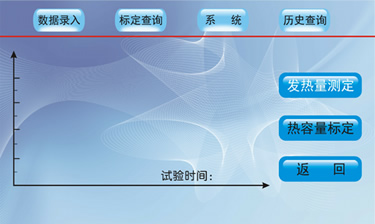 | 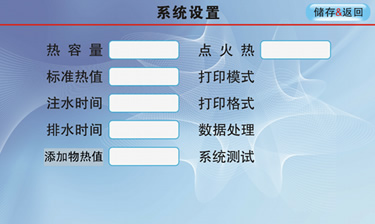 | |
Instrument Main Interface | System Settings Menu | |
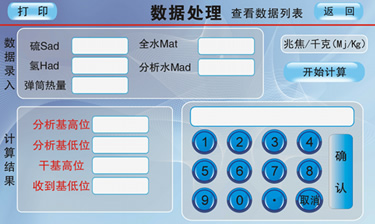 | 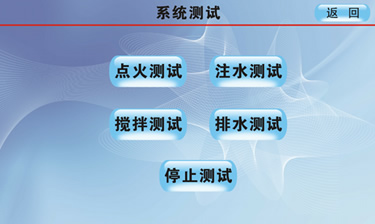 | |
Data Processing Menu | System Testing Menu |
System Settings Menu:
【Heat Capacity】: Click the white display box behind "Heat Capacity" to pop up the keyboard, where you can input the heat capacity. The system heat capacity is directly proportional to the measured calorific value. Input the average value of the calibrated heat capacity, then click "Save & Return" to save and return to the main system interface.
【Standard Calorific Value】: Click the white display box behind "Standard Calorific Value" to pop up the keyboard, where you can input the standard calorific value. This is the calorific value of the standard substance used during instrument calibration. Input the value directly based on the data on the packaging of the standard substance used, then click "Return" to save and return to the main system interface.
【Water Injection Time】: Click the white display box behind "Water Injection Time" to pop up the keyboard, where you can input the water injection time. This refers to the time for filling the inner cylinder with water, which affects experimental accuracy. It is generally set to submerge the oxygen bomb. Input an appropriate value based on the oxygen bomb volume and voltage, then click "Save & Return" to save and return to the previous menu.
【Drainage Time】: Click the white display box behind "Drainage Time" to pop up the keyboard, where you can input the drainage time. Set an appropriate drainage time to drain the test water from the inner cylinder.
【Ignition Heat】: Click the white display box behind "Ignition Heat" to pop up the keyboard, where you can input the ignition heat. The heat generated by ignition is set to 150J by default. If the length of the ignition wire and cotton thread remains unchanged, generally no adjustment is needed. If adjustment is required, input the new value, then click "Save & Return" to save and return to the previous menu.
【Additive Value】: Click the white display box behind "Additive Value" to pop up the keyboard, where you can input the additive value. For coal or other combustibles with low calorific value, auxiliary combustion substances are needed to ensure the sample burns completely. Input the calorific value of the additive (unit: J/g), then click "Save & Return" to save and return to the previous menu.
【Print Mode】: Click "Print Mode" to toggle the following number between 0 and 1. 0: Indicates automatic printing, meaning the test results are printed automatically after the experiment ends. 1: Indicates manual printing, meaning the results are not printed after the experiment ends and can be printed manually by clicking "Print".
【Print Format】: Click "Print Format" to toggle the following number between 0 and 1. 0: Standard format. 1: Simplified format, only effective for calorific value.
| Industry Category | Instruments & Meters/Specialized Instruments/Other Specialized Instruments |
|---|---|
| Product Category | |
| Brand: | 鹤壁标创仪器 |
| Spec: | ZDHW-10000W |
| Stock: | 20 |
| Manufacturer: | 鹤壁标创仪器仪表制造有限公司 |
| Origin: | 114106 |


