


XYGK-100D Digital Pressure Gauge
Contact Info
- Add:陕西省西安市高新区锦业一路72号雄华科技园A座306室, Zip:
- Contact: 李女士
- Tel:02981028005
- Email:xygk029@163.com
Other Products


XYGK-100D Precision Digital Pressure Gauge
I. Product Overview:
The XYGK-100D Precision Digital Pressure Gauge features a fully electronic structure, powered by batteries, and is easy to install on-site. It utilizes a high-precision piezoresistive pressure sensor at the front end, which processes signals through an amplifier and microprocessor, displaying the actual pressure value on an LCD screen.
This intelligent digital pressure gauge is flexible to use, simple to operate, easy to calibrate, and ensures safety and reliability. It is widely used in industries such as hydropower, water supply, petroleum, chemical, machinery, and hydraulics for measuring and displaying the pressure of fluid media.
II. Product Features:
1. Dual-screen display with clear and readable content
2. Main screen shows 5-digit real-time pressure
3. Secondary screen can display maximum, minimum, peak values, and ambient temperature
4. Graphical pressure percentage and battery level display
5. Overpressure flashing alert to prevent gauge damage
6. White backlight for easy viewing at night
7. 10 pressure unit conversions, internationally applicable
8. Sampling rate adjustable from 30 seconds per sample to 100 samples per second
9. Auto-shutdown function to extend battery life
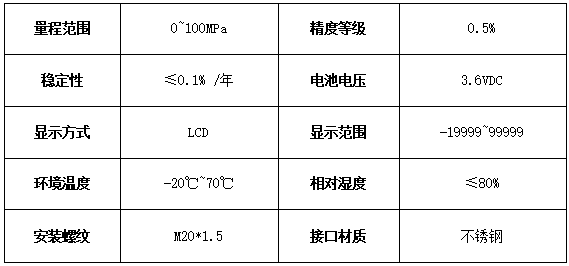
III. Technical Parameters: Digital pressure gauge accuracy customizable 1.0/0.5/0.2/0.1 grade
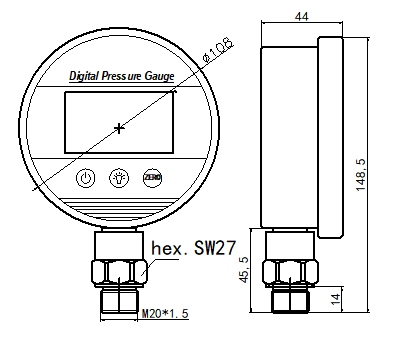
IV. Dimensions:
V. Installation:
Can be directly mounted on hydraulic pipelines or containers via pressure pipe fittings (M20*1.5) (other sizes can be specified when ordering).
VI. Function Settings:
6.1 Key Functions
1. Power On/Off Key "S1" Function Description:
2. Short press in measurement mode to turn on/off
3. Long press for 3 seconds in measurement mode to enter setup mode
4. Short press in setup mode to enable parameter modification (parameter flashes), press again to confirm modification (stops flashing)
5. Backlight On/Off Key "S2" Function Description:
6. Short press in measurement mode to toggle backlight
7. Long press for 3 seconds in measurement mode for quick unit switching
8. In setup mode, used for shifting and decrementing parameters; long press for continuous shift or decrement
9. "ZERO" Key "S3" Function Description:
10. Short press in measurement mode to clear peak, max, and min values; invalid when secondary screen shows ambient temperature
11. Long press for 3 seconds in measurement mode to zero pressure display
12. In setup mode, used to increment parameters; long press for continuous increment
Note: For ease of description, the three keys are named "S1", "S2", and "S3". If no key is pressed within 30 seconds in user or advanced user setup modes, it returns to measurement mode.
6.2 Setup Diagram:
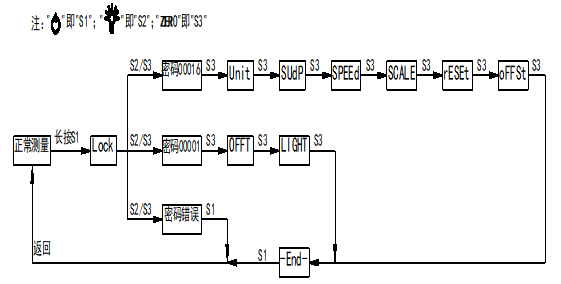
6.3 Setup Diagram:
User Menu:
Luck: Password input menu, range (19999~99999), secondary screen shows "PIN";
User password is "00001";
Advanced user password is "00016";
Returns to measurement mode if wrong password or no key press in 30 seconds
OFFT: Auto shutdown time, range (0~15);
"0" means no shutdown, secondary screen shows "ON" for always on;
"1~15" shows "Man" on secondary screen, unit in minutes
Light: Backlight duration in seconds
Options: "0,5,10,15,30,60,120,180,88"
"0" turns off backlight, shows "OFF";
"88" keeps backlight on, shows "ON"
Advanced User Menu:
Unit: Pressure unit setting, range (0~10), secondary screen shows unit symbols,
"10" hides unit; "Kef" for "kgf/cm²";
"MMH" for "mmH₂O"; "MH2" for "mH₂O";
Sup: Secondary screen mode, range (0~3),
"0" shows "PK" for peak value;
"1" shows "LOW" for minimum value;
"2" shows "HIG" for maximum value;
"3" shows "℃" for ambient temperature
Speed:
Sampling rate settings: 30s/sample, 15s/sample, 10s/sample, (1~5)s/sample, 2/s, 4/s, 8/s, 16/s, 32/s, 66/s, 100/s;
Secondary screen shows "t/S" for samples per second;
Shows "S/t" for seconds per sample
SCALE: Minimum display resolution, range (1~9), secondary screen shows calibration unit; affects last digit of main display
Zero: Zero masking value, range (0~10), secondary screen shows "%"
Masks zero drift within accuracy range, up to 1% of full scale; 1 digit = 0.1%
offset: Temperature correction for secondary screen, range (-10.0℃~10.0℃), shows "℃"
Adjusts secondary temperature display error
deal: Display limit switch, range (0~1)
"1" shows "yes" for over-range alert (flashing if pressure >125% or <25% of range);
"0" shows "NO" to disable
reset: Restore factory settings, range (0~1),
"0" shows "NO" for no reset;
"1" shows "yes" for reset;
Executed only after exiting and saving via "-End-" menu
6.4 Setup Method:
6.4.1. Long press " ", when secondary screen shows "LOCK", enter "00001", press "" to confirm and enter setup
6.4.2. Press "" to select menu to modify
6.4.3. Press "" to enable parameter edit (flashing)
6.4.4. Use "" and "ZERO" to adjust data
6.4.5. Short press "" to confirm (stops flashing)
6.4.6. Select "End-" menu and press "" to confirm and exit
VII. Usage Notes:
7.1. Suitable storage and use environment: -20℃~70℃, humidity <80%
7.2. Use 3.6V battery for replacement
VIII. Ordering Information:
Specify range, accuracy grade, and interface size when ordering
IX. Warranty:
One-year warranty from date of shipment under proper use and maintenance
| Business Phone | |
| Contact 1 | (029) 8102-8005 |
| Contact 2 | (029) 8113-6005 |
| Business Inquiry | 180 9252 2930 |
| Product Service | 135 7149 5999 |
| Technical Support | 139 9190 0175 |
| Industry Category | Instruments & Meters/Pressure Instruments/Other Pressure Instruments |
|---|---|
| Product Category | |
| Brand: | 西仪工控 |
| Spec: | |
| Origin: | 116101 |


