


Xiyi 2088 Pressure Transmitter LCD Display Module
Contact Info
- Add:陕西省西安市高新区锦业一路72号雄华科技园A座306室, Zip:
- Contact: 李女士
- Tel:02981028005
- Email:xygk029@163.com
Other Products


2088 Pressure Transmitter LCD Display Module, Pressure Transmitter LCD Display Head
I. Product Overview:
1. Fully intelligent two-wire 4-20mA operation, 5-digit LCD display.
2. Constant current and constant voltage excitation for the sensor: constant current 0.4mA, constant voltage 2.5VDC.
3. ADC input range of ±5mV to ±80mV, providing 24-bit core resolution with up to 18 useful bits. The built-in amplification factor of the circuit board is 12 to 200 times. Supports automatic polarity conversion for sensor signals.
4. Suitable for diffused silicon pressure sensors and ceramic pressure sensors.
5. Provides functions such as main variable zeroing, active and passive migration, 19 unit conversions, 6 display modes, display resolution adjustment, and factory data restoration, catering to the specific needs of various customers.
6. 2 to 5-point nonlinear correction function to eliminate nonlinear errors of the sensor.
7. Fully digital calibration with no movable potentiometers, resulting in lower temperature drift.
8. Enhanced anti-interference design, suitable for various industrial environments with harsh electromagnetic conditions.
II. Production and Usage Flowchart:
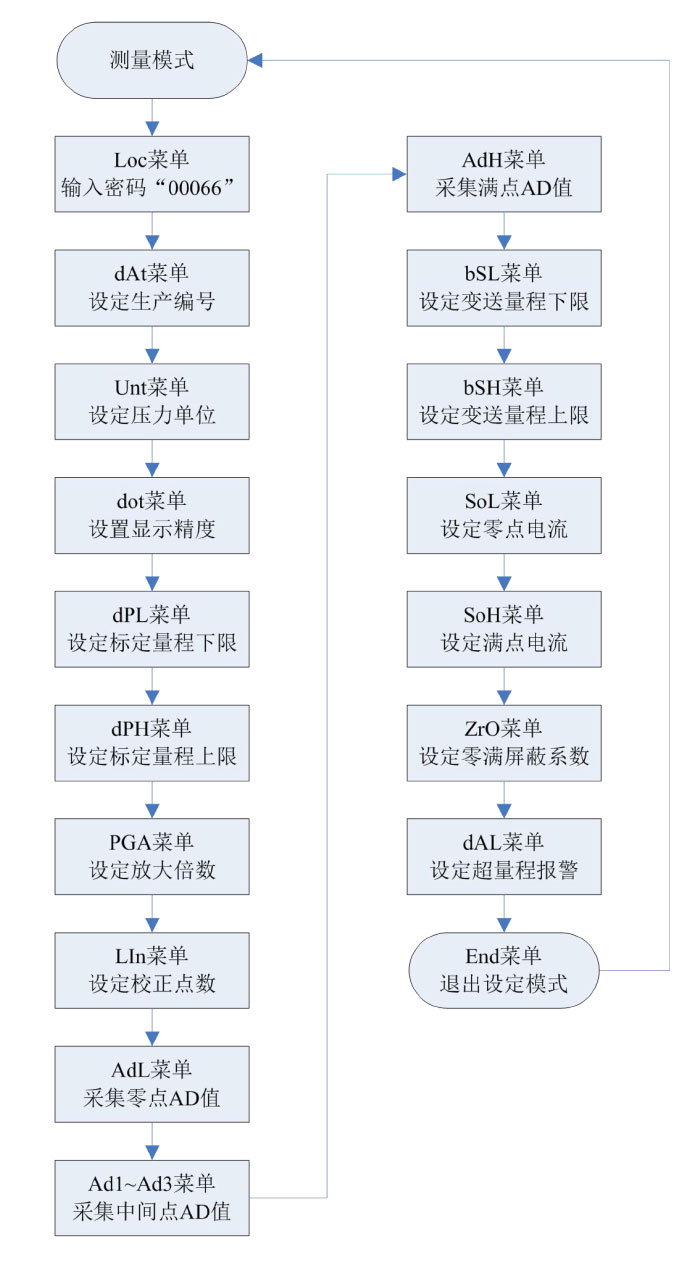
III. Specifications:
1. Power supply voltage: 12-30VDC, recommended 24VDC. Minimal impact from power supply variations.
2. Signal range: Circuit board range is ±5mV to ±80mV, corresponding to a maximum output of 320mV for a 1.5mA diffused silicon sensor.
3. Constant current excitation: 0.4mA, suitable for sensors with constant current supply (3-8kΩ).
4. Constant voltage excitation: 2.5VDC/0.5mA, suitable for ceramic piezoresistive sensors.
5. Operating environment: Temperature -30 to 80°C, humidity <85%, dry and non-corrosive environment.
6. Dimensions: 53*53*23.
7. Load resistance: (VCC-12)/20mA Current output resolution: approximately 1μA.
8. Temperature drift coefficient: <35ppm/°C Display range: -19999 to 99999.
IV. Product Structure:
(1) External Diagram
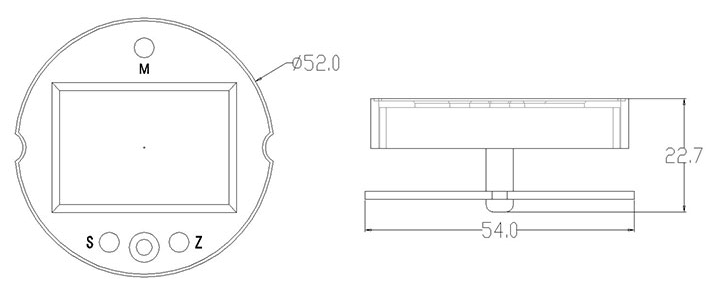
(2) Wiring Diagram (Shown for constant current excitation sensor connection)
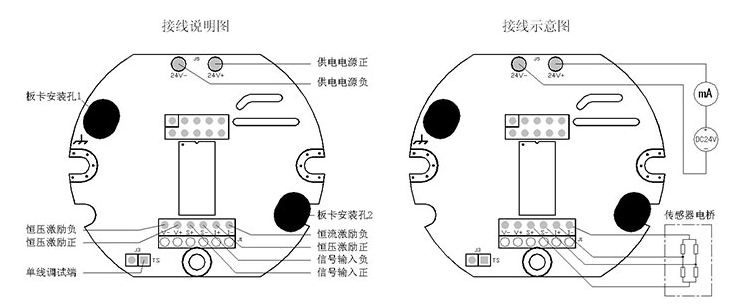
J3 in the diagram is the calibration communication single-wire interface.
J1 is the sensor terminal block, providing constant voltage and constant current excitation.
24V+ and 24V- are the two-wire transmitter terminals, providing DC24V power and outputting 4-20mA current signal.
V. Selection Guide:
(1) Head Area Description
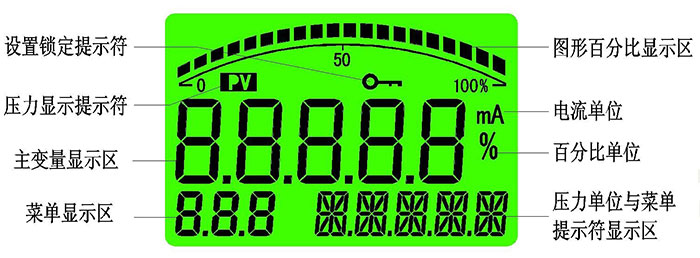
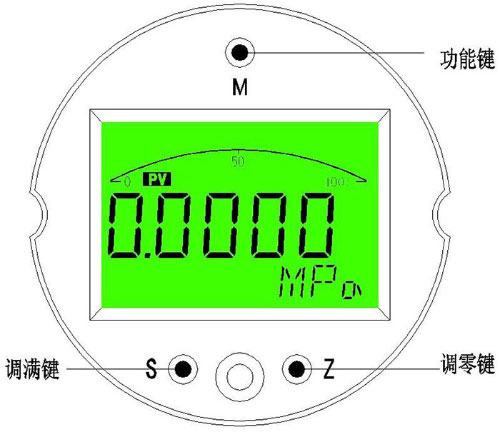
(3) Full Adjustment Key "S"
Short press in measurement mode to modify display mode function.
Long press for 5 seconds in measurement mode to enter full adjustment function (i.e., calibrate transmitter full scale).
In setting mode, it functions as parameter increment by one; long press for continuous shift and increment.
(4) Zero Adjustment Key "Z"
Short press in measurement mode to modify display mode function.
Long press for 5 seconds in measurement mode to enter zero adjustment function (i.e., calibrate transmitter zero point).
In setting mode, it functions as parameter shift and decrement by one; long press for continuous shift or decrement.
(5) Key Function Overview
The instrument uses three panel keys to implement all parameter input and calibration data setting and collection. The instrument's setting and input have adopted multiple optimization measures to improve customer operation speed:
The shift key and increment key have variable rate functionality.
The instrument supports both shift and incremental input methods: shift method for menus requiring large number modifications, and incremental method for menus requiring continuous data input.
The instrument stops analog output in setting mode, so if no operation is performed within 60 seconds, it automatically returns to measurement mode.
All set parameters are saved only when exiting the menu normally.
(6) Quick Functions
The instrument has three quick functions: main variable zeroing, active zero migration, and active full scale migration, facilitating quick on-site setup by users.
(7) Main Variable Zeroing
Main variable zeroing, or PV zeroing, is the zero point relative to atmospheric pressure, not the zero point of the sensor range. Place the transmitter directly under atmospheric pressure and long press the "M" key for more than 5 seconds to enter the main variable zeroing function. As shown in the right figure, the menu area displays "P=0". Use the "S" and "Z" keys to select the desired operation, with the prompt area displaying accordingly:
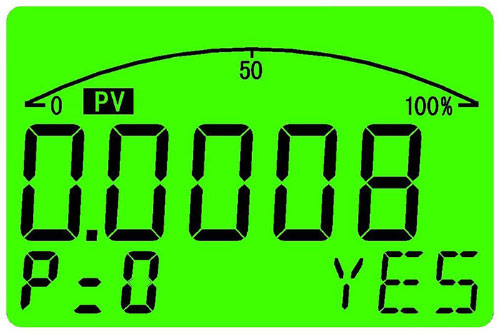
"NO": Do not perform main variable zeroing;
"YES": Perform main variable zeroing;
"RESET": Restore the zero point before the zeroing operation;
If no key operation is performed within 30 seconds, the instrument returns to measurement mode. This function is prohibited during production and is suitable for on-site use.
(8) Active Zero Migration
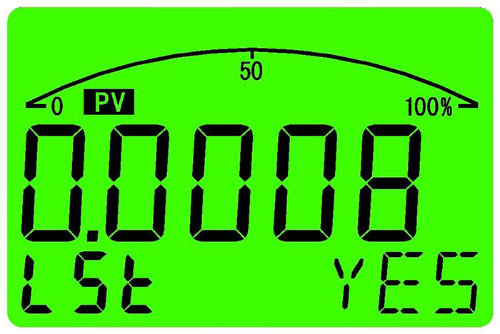
Active zero migration sets the current pressure as the transmitter's zero output. Apply zero pressure to the transmitter and long press the "Z" key for more than 5 seconds. The instrument will alternately display the current pressure value and the zero output current value. As shown in the right figure, the menu area displays "LSt". Use the "S" and "Z" keys to select the desired operation, with the prompt area displaying accordingly:
VI. Menu Description:
The instrument menu is divided into three levels: "Production Debugging Menu", "Advanced User Menu", and "General User Menu", distinguished by their respective access passwords.
"Production Debugging Menu"
Access password is "00066", used by the transmitter manufacturer to set basic parameters of the transmitter, determining accuracy, calibration values, etc. Therefore, the production debugging menu is not open to general users to prevent calibration data from being damaged.
"Advanced User Menu"
Access password is "00016", used for special settings required for on-site use of the transmitter.
"General User Menu"
Access password is "00001", allowing setting of display unit, display resolution, and display mode.
Note: In advanced user and general user menu settings, if no key operation is performed within 60 seconds, it will automatically exit the setting and return to measurement mode.
(1) Password Setting Menu
Loc: Password input menu, settable range (19999~99999), menu prompt "PIN".
Sets the menu access password. If the password is incorrect or no key operation is performed within 30 seconds, it automatically returns to measurement mode.
(2) General User Menu
Unt: User unit setting, settable range (0~18), menu prompt is the set units.
There are 19 unit settings: "MPa", "KPa", "Pa", "bar", "mbar", "PSI", "mH2O", "mmH2O", "InH2O", "ftH2O", "mHg", "mmHg", "InHg", "Kg/cm2", "atm", "Torr", "m", "cm", "mm".
dot: Display precision setting, settable range (0~4), menu prompt is the current pressure unit.
Display resolution refers to the number of decimal places displayed in measurement mode. Users can set it according to on-site requirements. More decimal places are not necessarily better; priority should be given to the stability of the displayed value. This menu value is also limited by the transmitter's maximum display value during calibration. If the set number of decimal places exceeds the 5-digit display range when displaying the transmitter's maximum value, the number of decimal places will be limited to ensure the maximum value can be displayed normally.
VII. Product Warranty:
Under conditions of proper use and maintenance, the instrument is warranted for one year from the date of shipment.
| Business Phone | |
| Contact Number 1 | (029) 8102-8005 |
| Contact Number 2 | (029) 8113-6005 |
| Business Inquiry | 180 9252 2930 |
| Product Service | 135 7149 5999 |
| Technical Support | 139 9190 0175 |
| After-Sales Service | 185 9188 9396 |
| Industry Category | Instruments & Meters/Pressure Instruments/Other Pressure Instruments |
|---|---|
| Product Category | |
| Brand: | 西安西仪工控仪表有限公司 |
| Spec: | 2088压力变送器液晶显示模块 |
| Manufacturer: | 西安西仪工控仪表有限公司 |
| Origin: | 116101 |


